Case1 - TDS calculation on Customer payment Receipt.
Supposed a company has billed to a customer of Rs 2000 which Aggregate Turnover is More than 10 Croes and transaction value is greater than 50Lac in a financial year then a company does not liable to apply TCS, customer deduct TDS on bill amount and pay remaining amount to company.
Customer setup for TDC deduction -
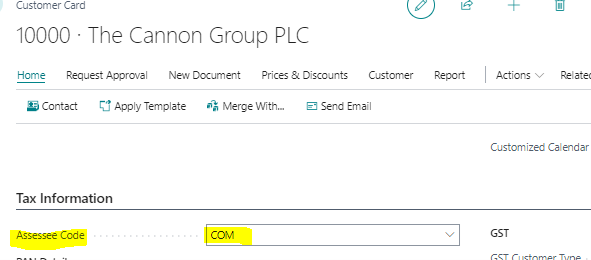
Open customer master and put Assessee Code in Tax Information tab. As below print screen
And
Check Vendor master PAN is available or not because TDS % is applicable according to PAN and Non-PAN.
Check Nod list for TDS setup for that vendor for which you want to deduct TDS.
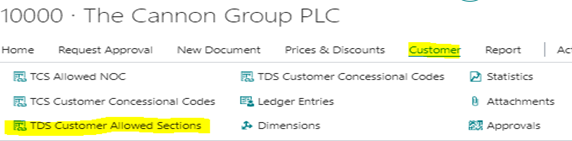
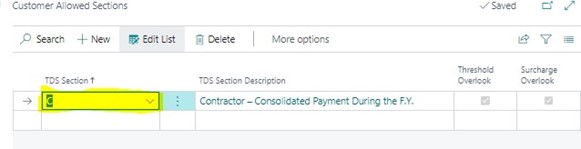
And TDS Customer Allowed Sections, choose TDS section which is applicable. As in below print screen.
Now generate customer payment receipt entry from bank payment receipt voucher.
Suppose Customer has received Rs, 2000 bill and now customer pay 10% after deducting TDS. This scenario
How a company book customer payment receipt as below print screen.
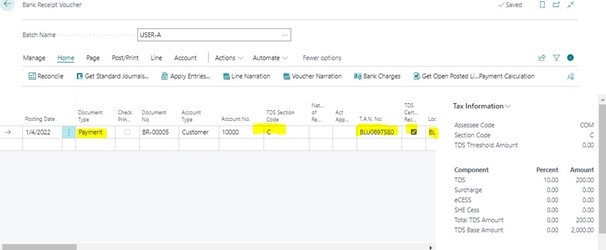
Document type = payment, location code and TAN No should have value in payment receipt entry.
Mark TDS Certificate Raceable Boolean True and chose TDS Section code. TDS will apply based on TDS Section code rate has defined in TDS rate.
TDS Entry in post preview.
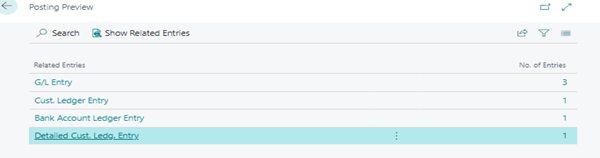
G/L entry with TDS as below.
